Coolthing Of Theday

  • Subscribe to our RSS feed.
  • Twitter
  • StumbleUpon
  • Reddit
  • Facebook
  • Digg
Showing posts with label SharePoint. Show all posts

Tuesday, 19 November 2013

A test lab to play with eDiscovery across Exchange Server 2013, Lync Server 2013, SharePoint Server 2013, and Windows Server 2012 file shares

Posted on 17:28 by Unknown

Microsoft Downloads - Test Lab Guide: Configure eDiscovery for an Exchange, Lync, SharePoint, and Windows File Shares Test Lab

Use these step-by-step instructions to configure eDiscovery across Exchange Server 2013, Lync Server 2013, SharePoint Server 2013, and Windows Server 2012 file shares. 

Version: 1.0

Date Published: 11/18/2013

eDiscoveryTLG.doc, 250 KB

eDiscoveryTLG.pdf, 531 KB

Some snaps and snips from the Doc;

image

In this guide

This guide takes you through configuring an eDiscovery solution. This solution uses SharePoint Server 2013 Search Service to crawl SharePoint, Exchange, Lync and Windows file shares for items that may be relevant to ongoing litigation. You’ll be doing this by using the five server computers and two client computers configured with server-to-server authentication from the Configure an Integrated Exchange, Lync and SharePoint test lab. You can view the Configure an Integrated Exchange, Lync, and SharePoint Test Lab overview video to help you get started.

Important

This TLG uses multiple virtual machines (VMs) to illustrate the separation of services and distribution of roles in the eDiscovery solution. In consideration of resource limitations though, the number of VMs used is kept to a minimum. The architecture that’s presented here is for test lab purposes only and should not be used in production. To see production scale architectures and sample topologies refer to:

· Technical diagrams for SharePoint 2013

· Exchange 2013 Planning and Deployment

· Lync 2013 Planning

For information about how to configure this test lab in Hyper-V, see Hosting the integrated Exchange, Lync, and SharePoint test lab with Windows Server 2012 Hyper-V.

...

Test lab overview

In this test lab, integrated functionality is deployed by using the following:

· One computer running Windows Server® 2012 named DC1 that is configured as an intranet domain controller, Domain Name System (DNS) server, and DHCP server.

· One intranet member server running Windows Server 2012 named SQL1 that is configured as a SQL database server and enterprise root certification server.

· One intranet member server running Windows Server 2012 named SP1 that is configured as a SharePoint Server 2013 web server, an enterprise root certification authority and with Windows file shares.

· One intranet member server running Windows Server 2012 named EX1 that is configured as the Exchange Server 2013 email server.

· One intranet member server running Windows Server 2012 named LYNC1 that is configured as the Lync Server 2013 Standard Edition server.

· One member client computer running Windows 8 named CLIENT1.

· One member client computer running Windows 8 named CLIENT2.

The integrated test lab consists of a single subnet named Corpnet (10.0.0.0/24) that simulates a private intranet. Computers on the Corpnet subnet connect by using a hub or switch. See the following figure.

image

Had to highlight this as it's in my day job business sphere... I don't know if/when corps will start using something like this, as apposed to the current commonly used "vaults" but it's good to see Microsoft starting to get into this space.

Read More
Posted in EDD, Exchange, SharePoint, VirtualMachine, WindowsServer | No comments

Tuesday, 8 October 2013

How do the Microsoft Office Servers Integrate? Here's a high level look....

Posted on 18:00 by Unknown

Microsoft Downloads - Feature Integration Across Microsoft Office Products

Illustrations for cross-server features: This multi-tab file includes descriptions and architecture illustrations for features that work across Microsoft Office server products. (Exchange Server, Lync Server, SharePoint Server) 

Version: 1.2

Date Published: 10/7/2013

SPEL_FeatureIntegration.vsd, 6.0 MB

SPEL_FeatureIntegration.pdf, 799 KB

image

image

image

I thought this kind of neat, seeing how these different server products integrate and leverage the different server features (and wonder at the possible pain troubleshooting it if something goes wonky...)

Read More
Posted in cheatsheet, Exchange, Lync, MicrosoftOutlook, SharePoint | No comments

Thursday, 3 October 2013

DebugDiag v2 is now out...

Posted on 17:24 by Unknown

Debug Diagnostic Tool - DebugDiag 2.0 is now RTW

The DebugDiag development team is very excited to announce the general availability of DebugDiag 2.0. The long waited DebugDiag 2.0 comes now with the new analysis engine fully converted to .NET to allow for faster analysis rule development. The tool comes also with a number of new features in the Collection and Analysis modules such as .NET 4.5 support, CLRMD integration, C# and XAML sample rules, Detailed 1st chance exception logging …etc.

The Debug Diagnostic Tool is a tool designed to help troubleshoot performance issues with Internet Information Services (IIS). Even though the tool was designed with troubleshooting IIS in mind it can be used to identify performance issues for any process...

Microsoft Downloads - Debug Diagnostic Tool v2.0

The Debug Diagnostic Tool (DebugDiag) is designed to assist in troubleshooting issues such as hangs, slow performance, memory leaks or fragmentation, and crashes in any user-mode process. The tool includes built-in analysis rules focused on Internet Information Services (IIS) applications, web data access components, COM+, SharePoint and related Microsoft technologies

Version: 2.0

Date Published: 10/2/2013

DebugDiagx64.msi, 21.4 MB

DebugDiagx86.msi, 16.6 MB

Debugdiag 2.0 introduces a new analysis engine host with built-in reporting framework that can be accessed from .NET. This new analysis engine simplifies analysis rule development in .NET.

  • DebugDiag 1.0 released as part of the IIS Diagnostic Toolkit and as a standalone tool (x86 only).
  • DebugDiag 1.1 released as a standalone tool only (x86 and limited x64 support).
  • DebugDiag 1.2 released as a standalone tool only (x86 and full x64 support).


DebugDiag is composed of two main modules: Collection and Analysis


Collection Module:
============
The collection module is composed of three main components: The Debugging service, the debugger host and the user interface. It is the base install component of the tool.

  1. Debugging service: DbgSvc.exe. The Debugging Service performs the following tasks:  ...
  2. Debugger Host : DbgHost.exe. The Debugger Host hosts the Windows Symbolic Debugger Engine (dbgeng.dll) to attach to processes and generate memory dumps. Dbghost.exe has no dependency on the service “DbgSvc.exe” and can be used separately.
  3. User Interface: DebugDiag.Collection.exe. The User Interface allows generation of control scripts, manual dump generation, displaying of rules status…etc. It is composed of two views: ...

Analysis Module
============
The analysis module is selected by default in a typical install; however, you can deselect the feature if not needed. The analysis module requires .NET 4.0 installed on the system.

  1. Analysis Engine: dbglib.dll, DebugDiag.DotNet.dll The analysis engine loads in the Analysis UI. It uses the Windows Symbolic Debugger Engine (dbgeng.dll) to access userdump data. It exposes this data via a rich API set that you can call from .NET code.
  2. Analysis UI: DebugDiag.Analysis.exe The analysis UI is a .NET 4.0 executable that allows you to runs selected "Analysis Rules" against one or more memory dumps. ...
  3. Rule Builder: DebugDiag.RuleBuilder.exe The Rule builder UI is a .net 4.0 Workflow application that allows you to create simple workflow analysis rules...

This is one of those items that I don't need today, but know that I will need in the future and won't be able to remember where I saw it. That and I think it sounds kind of cool... :)

Read More
Posted in .Net, Development, IIS, SharePoint | No comments

Tuesday, 30 July 2013

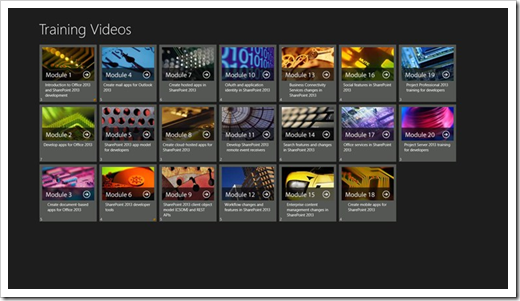
App Dev Training updated for SharePoint/Office 2013 (Now with a Windows App too)

Posted on 17:11 by Unknown

Apps for Office and SharePoint blog - Now available: Refresh of Office 2013 and SharePoint 2013 developer training

The developer training for Office and SharePoint 2013 now contains updated information about new features and capabilities for Office and SharePoint developers. In this post, learn about the 20 training modules, meet the presenters, and find answers to frequently asked questions.

We are excited to announce a refreshed version of the developer training materials for Office 2013 and SharePoint 2013 to help administrators, architects, and developers learn about new developer capabilities. The developer training package is publicly available from the Apps for Office and SharePoint Dev Center to help you get started building apps for Office and SharePoint today.

What was released?

The original training package released at Preview in July 2012 contained in-depth developer training content for many new features in Office and SharePoint. This version refreshes the previously released training package and provides updated materials to match the release-to-market (RTM) version of Office 2013 and SharePoint 2013. All videos are instructor-led and include slide shows. Most videos contain at least one demo that shows the concepts in detail.

The developer training package includes:

  • 56 videos
  • Over 20 hours of video instruction

The material is separated into the following 20 modules. Each module contains one or more videos lasting anywhere from five minutes to an hour.

  • Introduction to Office 2013 and SharePoint 2013 development
  • Develop apps for Office 2013
  • Create document-based apps for Office 2013
  • Create mail apps for Outlook 2013
  • SharePoint 2013 app model for developers
  • SharePoint 2013 developer tools
  • Create SharePoint-hosted apps in SharePoint 2013
  • Create cloud-hosted apps for SharePoint 2013
  • SharePoint 2013 client object model (CSOM) and REST APIs
  • OAuth and application identity in SharePoint 2013
  • Develop SharePoint 2013 remote event receivers
  • Workflow changes and features in SharePoint 2013
  • Business Connectivity Services changes in SharePoint 2013
  • Search features and changes in SharePoint 2013
  • Enterprise content management changes in SharePoint 2013
  • Social features in SharePoint 2013
  • Office Services in SharePoint 2013
  • Create mobile apps for SharePoint 2013
  • Project 2013 training for developers
  • Create apps with Access Services 2013

imageimage

Developer training | apps for Office and SharePoint

image

  • Module 1: Introduction to Office 2013 and SharePoint 2013 development
  • Module 2: Develop apps for Office 2013
  • Module 3: Create document-based apps for Office 2013
  • Module 4: Create mail apps for Outlook 2013
  • Module 5: SharePoint 2013 app model for developers
  • Module 6: SharePoint 2013 developer tools
  • Module 7: Create hosted apps in SharePoint 2013
  • Module 8: Create cloud-hosted apps for SharePoint 2013
  • Module 9: SharePoint 2013 client object model (CSOM) and REST APIs
  • Module 10: OAuth and application identity in SharePoint 2013
  • Module 11: Develop SharePoint 2013 remote event receivers
  • Module 12: Workflow changes and features in SharePoint 2013
  • Module 13: Business connectivity services changes in SharePoint 2013
  • Module 14: Search features and changes in SharePoint 2013
  • Module 15: Enterprise content management changes in SharePoint 2013
  • Module 16: Social features in SharePoint 2013
  • Module 17: Office services in SharePoint 2013
  • Module 18: Create mobile apps for SharePoint 2013
  • Module 19: Project Professional 2013 training for developers
  • Module 20: Create apps with Access Services 2013

Apps for Office and SharePoint Developer Training

imageimage

Description

This app allows you to view the MSDN training videos on developing apps for Office and SharePoint and store your progress as you work through the entire course. Stop viewing any video in any module, and you can return later.
Orange dots indicate partial progress through a module, and green dots indicate completed modules.

Release 2: Updated video player supports closed captioning and full-screen view. Assorted UI and bug fixes.

...

Office 2013 is starting to pick up a little steam as is its new app dev model. Given that Office 365 is also doing well, I think now's the time to get looking at this...

Read More
Posted in Development, MicrosoftOffice, MicrosoftOutlook, SharePoint, Training | No comments

Tuesday, 16 July 2013

“Productivity Hub SP1” = Office 2007/2010 Module of training and doc's for SharePoint 2010 (Think Plug in Module, Play lots of Training)

Posted on 18:29 by Unknown

Kurt Shintaku's Blog - DOWNLOAD: “Productivity Hub SP1” – Installable Training Module for SharePoint Server 2010

The “Productivity Hub” is a free, downloadable module that plugs into SharePoint Server 2010. (Note: There’s also a version that plugs into SharePoint Server 2007) 

It is essentially a massive 2GB+ self-service training web site that provides end users with a place to review training & quick reference content for each of the major Office & Windows products – including Windows 7 & Internet Explorer 9.  It provides video training, documentation, as well as Q&A areas featuring “coaches” that a company can designate within your org to help other people. 

What makes it unique is that the site is completely extensible by mere mortals.  Customers that use Productivity Hub can create new areas for, say, Adobe Acrobat… or Box… or whatever 3rd party application you’d like to provide self-services support for, and publish your own documentation, videos, etc.

There is a demo site for you to peruse to see what the Productivity Hub looks like on your own.  The location of where to download all the content packages for Productivity Hub are also listed below:...

Productivity Hub 2010 SP1

Version: 2010 SP1

Date Published: 3/18/2013

ContentPack2010SP1-1.exe, 460.0 MB
ContentPack2010SP1-2.exe, 441.4 MB
ContentPack2010SP1-3.exe, 470.4 MB
ContentPack2010SP1-4.exe, 718.8 MB
CoreInstall2010SP1.exe, 14.0 MB

Microsoft has developed the Productivity Hub to help support your ongoing end user training efforts.

The Hub is a SharePoint Server site collection that serves as a learning community and is fully customizable. It provides a central place for your training efforts, and includes training content from Microsoft’s core products. Microsoft also provides ongoing and updated content packs.

The Hub uses SharePoint Server’s social networking capabilities, such as blogs and discussion groups. In addition, it offers the Coach program, a change management feature to help you train end users to self-help, reducing the burden on your training and IT staff. The Coach program impacts productivity in a collaborative and positive way.

The 2010 SP1 version of the Productivity Hub includes a quiz feature, a section called ‘Get it Done’ that offers training for tasks such as email management and collaboration, and also features Silverlight. However, instructions are also provided to use non-Silverlight web parts, if needed.

What the Productivity Hub is:

  • Format: Pre-loaded SharePoint site collection, optimized for Web 2.0 functionality and easily deployed within SharePoint 2010 SP1 environment
  • Content: Convenient end user productivity training in a variety of formats (documents, videos, podcasts, etc.). Receive free periodic updates of content that you will learn about through the Productivity blog.
  • Blog: The Productivity blog offers tips and tricks for end user productivity. Use it as is, or your training staff can use the posts as their own to help them get started in running an internal blog.
  • Train the trainer: Includes IT/Manager section to aid with deployment of the site collection, and guidance to develop the Coach program
  • Products: Office (2007 & 2010), SharePoint (2007 & 2010), Windows 7, Internet Explorer 9, Project (2007 & 2010), Visio (2007 & 2010), Publisher (2007 & 2010), Live Meeting 2007, Communicator 2007, Groove 2007 and Lync 2010 You can also download additional content packages that expand the training materials you can make available through the Hub.


imageimage

One set of downloads, bunches of training free training for your users. I mean, come on, it's free and will make you a training doc's hero! Your users will throw flowers in front of you as you walk by, name their first born after you... okay, okay, maybe I exaggerate a little :)

Anyway, Keeping my eyes open for the Office 2013 version...


Related Past Post XRef:
Turn your intranet into a training “Productivity Hub” – A SharePoint site collection prefilled with Microsoft Office and SharePoint training materials (optional reg-ware)

Read More
Posted in MicrosoftOffice, MicrosoftOutlook, SharePoint, Training | No comments

Wednesday, 19 June 2013

Eric triple downs on his Free Microsoft eBook List... (Windows, Visual Studio, SQL Server, Office, Azure and More)

Posted on 08:01 by Unknown

Microsoft Sales Excellence Program Manager - Eric Ligman - Huge collection of Free Microsoft eBooks for you, including: Office, Office 365, SharePoint, SQL Server, System Center, Visual Studio, Web Development, Windows, Windows Azure, and Windows Server

Last summer I put up a post that offered a collection of free Microsoft eBooks across a variety of topics and the response was incredible. Because of the phenomenal response, I followed it up with a second post that contained another set of free eBooks for people to download. After these posts went live, over 1,000,000 free eBooks were downloaded by people around the world!

Well, I thought I would once again put together another new collection of absolutely FREE Microsoft eBooks for all of you to access and download to use in your quest for information, resources, knowledge, etc. As with the past collections, these eBooks are completely FREE, they are not time-bombed, there is no catch, and yes, please let your friends, family, colleagues, or anyone else that you think would benefit from these know that they are available here and to come download the ones they are interested in. I’d love to give away another 1,000,000 free eBooks again this round, so spread the word and please enjoy these resources from Microsoft to you.

  • Office & Office 365
  • SharePoint
  • SQL Server
  • System Center
  • Visual Studio
  • Web Development
  • Windows
  • Windows Azure
  • Windows Server

imageimageimageimage

Should be enough to keep you busy as you lay on the beach this summer?


Related Past Post XRef:
Eric's done it again... ANOTHER large collection of free eBooks and Resource Kits
A Microsoft eBook Bonanza - Office, SQL Server, Development, WinPhone, Career and more
Microsoft Technologies E-Book Gallery (TechNet Wiki)

Read More
Posted in Azure, Development, ebook, MicrosoftOffice, SharePoint, SQLServer, VisualStudio | No comments

Friday, 12 April 2013

What do Fiddler, LinqPad, Excel and SharePoint have in common? Testing and consuming OData of course!

Posted on 07:40 by Unknown

.Net Curry - Testing and Consuming OData Services using Fiddler, LinqPad, Excel and SharePoint

Abstract: Consume and test OData Services by using different tools like Fiddler, LINQPAD, EXCEL, and SharePoint Server 2013 Excel Services OData.

In this article, we will take a closer look on the different tools we can use for Consuming and Testing OData Services. We will look at Fiddler, LINQPAD, EXCEL, and SharePoint Server 2013 Excel Services OData.

A couple of days ago, I demonstrated how to Perform CRUD Operations using OData Services in .NET. If you have not gone through the article, you can take a quick peek at it to understand how OData works. OData (Open Data Protocol) is a web protocol for performing CRUD operations which is built upon web technologies like HTTP, Atom Publishing Protocol (AtomPub) and JSON to provide access to the data to various applications, services and stores. Today we’ll see how we can use some tools and products available to test and consume OData services.

...

image..."

I really liked the mix of things shown and used in this post. How can you go wrong with Fiddler and LinqPad in the same post! (Let alone with OData goodness...)

Read More
Posted in Development, MicrosoftOffice, OData, SharePoint, Web X.X | No comments

Tuesday, 9 April 2013

Office Web Apps Server isn't just for SharePoint... Can you say "WOPI" (Web application Open Platform Interface)?

Posted on 08:59 by Unknown

Microsoft Office SharePoint and related - Office Web Apps Server - use it not only with SharePoint 2013 to access documents

With SharePoint 2013 the server part to edit/view Office documents with the browser is now a separate product and needs to be also installed separately. Therefore why not use this new server to show office documents from other sources?

We are using WOPI (Web Application Open Platform Interface) so that SharePoint 2013 and OWAS 2013 can communicate. A colleague wrote a great article what you need to know to implement WOPI into your own Web Application.

Office Developer Blog - Introducing WOPI

This blog post describes how to create a custom WOPI host.  A WOPI host is document storage location that can connect to Office Web Apps Server to open Office documents in the browser.  When the WOPI host is configured to use Office Web Apps Server, users are able to view and edit documents stored on the WOPI host by using Office Web Apps. Tyler Butler, Program Manager, Office Shared Experiences team, authored today’s post.

One of the great things about the Office Web Apps is that they let people work with their documents anywhere, on any computer. It turns out that there are lots of documents in lots of different places. For example, consider Outlook.com, or more generally, web-based email. You probably get documents sent to you via email every so often, and you probably want to open those documents to read them. One option is to download the file and open it in an application on your local computer. But if you're really just wanting to quickly check out the contents of the document, wouldn't it be easier if you could just click the document and have it open immediately in the browser? Wouldn't it be cool if that worked regardless of what software you had installed on your local computer? It could work when you're traveling and using an internet cafe computer, when you're using a friend's computer, or when you're at a conference and using a shared computer there.

With the most recent release of the Office Web Apps, developers can enable such scenarios in their apps directly by implementing the Web Application Open Platform Interface (WOPI). WOPI provides web-based services a way to view and edit documents in the Office Web Apps, with all the high-fidelity and richness that you expect from an Office document. While email attachments are a great example, there are plenty of other places where documents are used on the web -- bank statements, file-synchronization services like SkyDrive and Dropbox, etc. -- and there are compelling ways developers can leverage WOPI to treat those documents as something more than just a file that users download.

So if you’re a developer, this post is for you. Simply put, WOPI is the glue that connects the web apps to your documents, and it's an interface that you can implement yourself -- to dazzling effect. In this post series I'll talk about what WOPI is, walk through the basics of implementing it, and show you an example implementation.

In addition to this post, WOPI is documented in the [MS-WOPI] protocol document. That document is the authoritative documentation on the interface.

Fundamentals

To better understand what WOPI is conceptually, consider this: Have you ever opened a document on your computer by double-clicking the file and watch it open in Word? When you did that, you signaled the operating system that you wanted to open the file, so the OS figured out what application was associated with that file type, then passed the file over to the application to handle. That's a very basic description of the process, but conceptually that's what happens.

WOPI provides similar semantics for web applications, but the web is a little different than your local hard drive, so the process of opening the file is also a little different. In my simplified example above, the document was stored on your hard drive, and the operating system handled passing the file off to the application to open. In the scenarios for which WOPI was designed, though, the document is stored somewhere on the web. We call those document storage locations WOPI hosts or WOPI servers. This term will become a little clearer in just a moment, but think of a WOPI host as a service like SkyDrive. It's a place where you can put your documents or other files and make them accessible on the web.

If a WOPI host is a place where your files are stored, then what about the actual applications that open those files? We unsurprisingly call those WOPI applications or WOPI clients; the Word/Excel/PowerPoint/OneNote web apps are all examples of WOPI applications. These applications support various different actions, such as view or edit, and these actions can apply to different file types.

Going back to my original example of the document on your hard drive, the WOPI host is kind of like the hard drive -- but a little smarter. It stores the documents. The WOPI application is the app capable of performing an action -- doing something, in other words -- on those files, and WOPI is the interface that those two entities use to talk to one another. If you're a service or application that stores documents, then you can implement WOPI, making yourself a WOPI host, and WOPI applications such as the Office Web Apps can then consume the documents you're storing. Pretty compelling, huh? The rest of this post will go into the details of the interface.

...

image

..."

Interesting and cool that it's documented in detail (in my mind, a 59 page PDF for something like this equals detailed documentation ;)

In thinking about this, this could be pretty wow. Imagine you're an app provider/host (like say in the eDiscovery space...) and want to provide very high fidelity views of Office doc's, without the user having to download the file and open it locally, without requiring a plug-in or third party component. Where the file and service is under your control, all private cloud stuff, and neither is hosted in SharePoint.... I think WOPI fits this bill... hum... Must research this.

Read More
Posted in MicrosoftOffice, SharePoint, WOPI | No comments
Older Posts Home
Subscribe to: Posts (Atom)

Popular Posts

  • Learning Log Parser Studio in two parts... (From Install to Library Ninja)
    Kary Wall - Getting Started with Log Parser Studio - Part 1 & Getting Started with Log Parser Studio - Part 2 Hopefully, if you a...
  • Mr. 7,000! This is my 7,000th post...
    Before this post; After; 20 visits between taking these snaps? Oh wait, that's probably me searching for past related posts....
  • Viasfora - Your new favorite Visual Studio Text/*ML Editing Extension?
    Winterdom - Introducing Viasfora A couple of days ago, I unveiled Viasfora , my latest attempt at building a decently packaged extensi...
  • Exchange Online getting serious about helping with eDiscovery
    The Exchange Blog - Preserve mailbox data for eDiscovery using inactive mailboxes in Exchange Online In Exchange Online and Exchange S...
  • Greg's //build bets - My total and complete WAG's about next week's //build event
    These are my complete and total WAG's (Wild Ass Guesses) about what we might get, see and hear about at next week's //build (which I...
  • Clide, your guide to Visual Studio Extensibility sanity...
    Daniel Cazzulino's Blog - High level overview of Visual Studio Extensibility APIs If your head is dizzy with the myriad VS service...
  • Scrum Primer, the v2...
    Scrum Alliance - The Scrum Primer The Scrum Primer is an in-depth introduction to the theory and practice of Scrum, and includes data ...
  • Rad Gate Post... Get your Red Gate Post here...
    simple talk - Melanie Townsend - Get a copy of the Red Gate Post We recently put together a newspaper of some of the best articles fr...
  • Windows 8.1 Store App Paper Prototyping Templates
    Jason Roberts Don't Code Tired   - Paper Prototyping Templates for Windows 8.1 Store Apps These are updated paper prototyping templ...
  • [Hardware Review] Life with Haswell... Haswell/Harris Beach Intel SDS Ultrabook Review - Part 2
    "So Greg, how's life with Haswell been?" "Pretty Sweet! (Mostly)" I've been given an opportunity to review t...

Categories

  • .Net
  • 3DPrinting
  • AFeedYouShouldRead
  • Agile
  • ALM
  • Amazon
  • Amiga
  • Analytics
  • Android
  • ASP.NET
  • Azure
  • BigData
  • bing
  • Blogging
  • Book
  • BookReview
  • BUILD
  • C
  • C#
  • C++
  • Career
  • Cat
  • cheatsheet
  • ClickOnce
  • Cloud
  • ComputerHardware
  • css
  • Data
  • DBA
  • DependencyInjection
  • Deployment
  • Design
  • Development
  • devops
  • DVCS
  • ebook
  • EDD
  • Education
  • EnterpriseLibrary
  • EntityFramework
  • Exchange
  • Expression
  • gadget
  • Game
  • GIT
  • Google
  • Government
  • Hadoop
  • hardware
  • HardwareReview
  • HaswellReview
  • HTML5
  • Humor
  • IE
  • IEExtension
  • IfAllElseFails
  • IIS
  • ILMerge
  • Image
  • Infographic
  • interview
  • InversionOfControl
  • Java
  • Javascript
  • Kinect
  • LightSwitch
  • LINQ
  • Linux
  • LosAngeles
  • Lucene
  • Lync
  • MEF
  • Metro
  • MicrosoftOffice
  • MicrosoftOutlook
  • Mono
  • MVC
  • MVVM
  • NetMon
  • NLP
  • NoSQL
  • NuGet
  • OData
  • OneNote
  • OpenXML
  • Paint.Net
  • Personal
  • Photosynth
  • Physics
  • portable
  • Poster
  • PowerShell
  • Preparedness
  • Presentation
  • Prism
  • PrivateCloud
  • RegEx
  • RemoteDesktop
  • Reporting
  • RIAServices
  • Science
  • ScienceFiction
  • Scratch
  • Scrum
  • ServiceBus
  • SharePoint
  • Silverlight
  • SimiValley
  • SPA
  • Space
  • SQLServer
  • Storyboard
  • Surface
  • SVG
  • SystemAdministration
  • T4
  • TeamBuild
  • TeamFoundationServer
  • TechEd
  • Training
  • TypeScript
  • UnitTesting
  • UnityApplicationBlock
  • Utility
  • Veteran
  • VirtualMachine
  • Visio
  • VisualBasic
  • VisualStudio
  • WCF
  • Web X.X
  • Webcast
  • WebFeed
  • WebMatrix
  • Windows
  • Windows7
  • Windows8
  • Windows8.1
  • WindowsHomeServer
  • WindowsLiveWriter
  • WindowsPhone
  • WindowsServer
  • WinRT
  • WiX
  • WMI
  • WOPI
  • WPF
  • XAML
  • XBox360
  • XboxOne
  • zombie

Blog Archive

  • ▼  2013 (500)
    • ▼  December (12)
      • Free Export DataSet/DataTable/List<t> to Excel (wi...
      • wxHexEditor, your new large, 16EBs (exabytes) larg...
      • Think your passwords rock? Check out Telepathwords...
      • Rad Gate Post... Get your Red Gate Post here...
      • [Humor] A familiar looking Project Team?
      • Slicing .NET - NSlice, the Python like Slice for .Net
      • WiX'ing in VS 2013. WiX 3.8 adds VS 2013 support, ...
      • The TFS Upgrade Guide gets... well... upgraded. v3...
      • Windows 2012 Server Edition Comparison Matrix and ...
      • RegEx'ing - The RefCardz
      • 200 C# Video Tutorials? 200 VB? JavaScript? PHP? C...
      • What's the [table]diff? Diff'ing SQL Server tables...
    • ►  November (61)
    • ►  October (65)
    • ►  September (38)
    • ►  August (47)
    • ►  July (75)
    • ►  June (39)
    • ►  May (40)
    • ►  April (42)
    • ►  March (39)
    • ►  February (42)
Powered by Blogger.

About Me

Unknown
View my complete profile